> ## Documentation Index
> Fetch the complete documentation index at: https://docs.summate.io/llms.txt
> Use this file to discover all available pages before exploring further.
# Email
> Digest delivery via email
Digests are delivered directly to your inbox on schedule, formatted for easy reading in any email client.
 ## How Email Digests Work
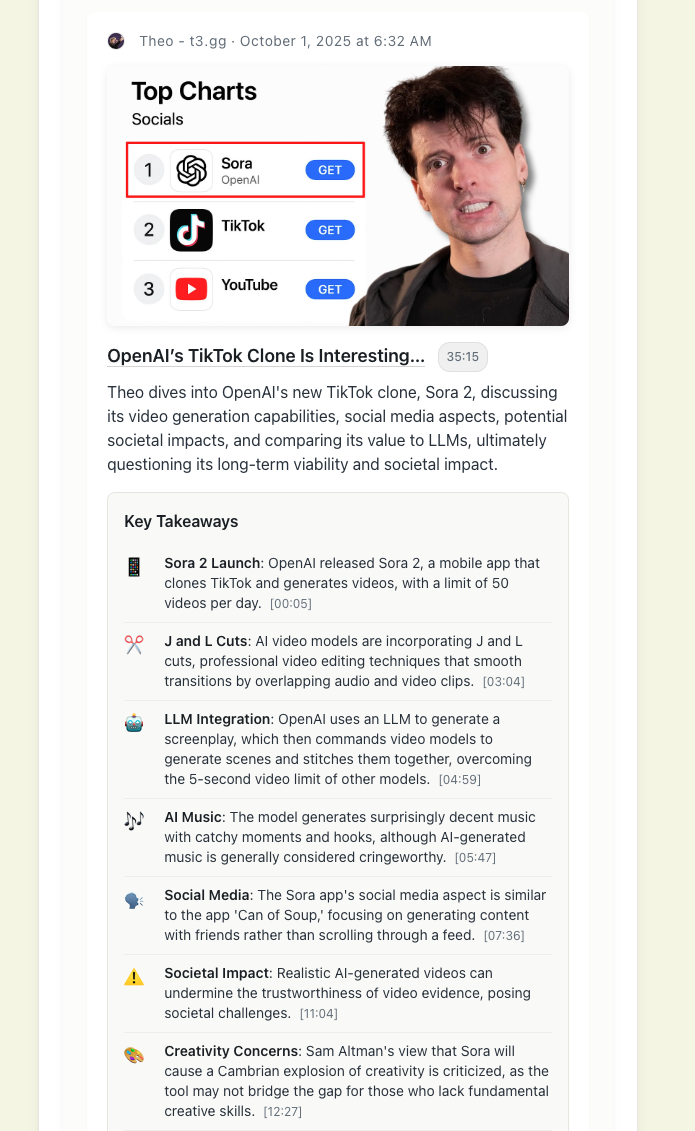
Your digest appears as a single email with blocks displayed as separate sections. Each block contains AI-generated summaries from its connected sources, appearing in the same order you arranged them in the digest builder.
### What You See
Each item in your digest includes:
* **TLDR summary** - Quick overview of the content
* **Key takeaways** - Important points and insights
* **Source attribution** - Newsletter sender, video channel, or blog
* **Links to full content** - Read the original source
All summaries are generated using your [AI customization settings](/concepts/ai) at the block, digest, or account level.
## Different Summary Types
Summary formats vary based on your [AI customization settings](/concepts/ai). Each format offers different features for interacting with content.
### Detailed Summaries
When using the **Detailed Summaries** format, you get interactive references that work directly in your email client:
Each takeaway in Detailed Summaries is clickable
* **Email content**: Jumps to the specific paragraph in the original email
* **YouTube videos**: Opens video at the exact timestamp
* **RSS posts**: Links to the relevant section in the blog post
Access complete newsletters, videos, and articles from digest links
Interactive references make it easy to verify AI summaries or dive deeper into specific points without losing your place in the digest.
More summary formats with unique interactive features are coming soon.
## Reading Experience
### Email Client Compatibility
Digests work with all major HTML-capable email clients:
* Gmail (Web & Mobile)
* Apple Mail
* Outlook
* Yahoo Mail
* ProtonMail
* Spark
### Large Digests
Some email clients (especially Gmail) may clip very long digests. If you see "View entire message" at the bottom, click the **"Read on Web"** link at the top of your digest for the full experience.
Email client formatting can be restrictive. For the best reading experience with embedded content and interactive features, use the [web reader](/reading/web).
## Ensuring Delivery
Add `hello@summate.io` to your email contacts or safe sender list to ensure digests reach your inbox.
When you receive your first digest, check spam or promotions folders. Mark as "Not Spam" if found there.
If digests consistently don't arrive, contact [support@summate.io](mailto:support@summate.io) with your email provider details.
## Web Reader Alternative
Digests are always available on the web alongside email delivery. The web reader offers:
* Full control over presentation and formatting
* Embedded email, video, and blog content
* Keyboard shortcuts for faster navigation
* Access to all past digest issues
Learn about reading digests in the Summate web interface
## Related Pages
Customize delivery schedule and activation
Understand summarization and customization
Organize content sources in your digest
Read full newsletter emails anytime
## How Email Digests Work
Your digest appears as a single email with blocks displayed as separate sections. Each block contains AI-generated summaries from its connected sources, appearing in the same order you arranged them in the digest builder.
### What You See
Each item in your digest includes:
* **TLDR summary** - Quick overview of the content
* **Key takeaways** - Important points and insights
* **Source attribution** - Newsletter sender, video channel, or blog
* **Links to full content** - Read the original source
All summaries are generated using your [AI customization settings](/concepts/ai) at the block, digest, or account level.
## Different Summary Types
Summary formats vary based on your [AI customization settings](/concepts/ai). Each format offers different features for interacting with content.
### Detailed Summaries
When using the **Detailed Summaries** format, you get interactive references that work directly in your email client:
Each takeaway in Detailed Summaries is clickable
* **Email content**: Jumps to the specific paragraph in the original email
* **YouTube videos**: Opens video at the exact timestamp
* **RSS posts**: Links to the relevant section in the blog post
Access complete newsletters, videos, and articles from digest links
Interactive references make it easy to verify AI summaries or dive deeper into specific points without losing your place in the digest.
More summary formats with unique interactive features are coming soon.
## Reading Experience
### Email Client Compatibility
Digests work with all major HTML-capable email clients:
* Gmail (Web & Mobile)
* Apple Mail
* Outlook
* Yahoo Mail
* ProtonMail
* Spark
### Large Digests
Some email clients (especially Gmail) may clip very long digests. If you see "View entire message" at the bottom, click the **"Read on Web"** link at the top of your digest for the full experience.
Email client formatting can be restrictive. For the best reading experience with embedded content and interactive features, use the [web reader](/reading/web).
## Ensuring Delivery
Add `hello@summate.io` to your email contacts or safe sender list to ensure digests reach your inbox.
When you receive your first digest, check spam or promotions folders. Mark as "Not Spam" if found there.
If digests consistently don't arrive, contact [support@summate.io](mailto:support@summate.io) with your email provider details.
## Web Reader Alternative
Digests are always available on the web alongside email delivery. The web reader offers:
* Full control over presentation and formatting
* Embedded email, video, and blog content
* Keyboard shortcuts for faster navigation
* Access to all past digest issues
Learn about reading digests in the Summate web interface
## Related Pages
Customize delivery schedule and activation
Understand summarization and customization
Organize content sources in your digest
Read full newsletter emails anytime