> ## Documentation Index
> Fetch the complete documentation index at: https://docs.summate.io/llms.txt
> Use this file to discover all available pages before exploring further.
# Quickstart
> Get your first digest in 5 minutes
Set up your first Summate digest in just 5 minutes and start receiving AI-powered summaries of your newsletters, YouTube videos, and blogs.
## What You'll Build
A personalized digest that automatically:
* Summarizes newsletters, YouTube videos, and blog posts
* Arrives on your schedule (daily, weekly, or monthly)
* Delivers via email and web reader
 Go to [summate.io](https://summate.io?ref=docs.summate.io) and click "Start free trial". During onboarding:
1. **Tell us about yourself** - Share your interests so AI can personalize your summaries
2. **Connect your accounts** - Link YouTube and Substack for quick setup
3. **Get personalized digests** - We'll create digests based on your profile, or choose from our curated library
**What you get:**
* 14-day free trial
* 2000 AI credits per month
* Pre-configured digests based on your interests
The more you share during onboarding, the better we can tailor your digest recommendations and AI summaries.
After onboarding, you'll have digests already created for you. Customize them by adding, removing, or editing [blocks](/concepts/blocks):
For newsletters you receive via email:
1. **Create your [Summate Inbox](/concepts/inbox)** - Get a unique address like `username@inbox.summate.io`
2. **Forward newsletters** to your inbox ([setup guide](/guides/auto-forwarding/overview))
3. **Select senders** to include, or choose "Include All" for automatic inclusion
All approved senders are available as sources. Block spam senders with one click.
For YouTube channels you follow:
1. Connect your YouTube account to import subscriptions, or
2. Paste channel URLs manually
3. Select which channels to include
If you connected YouTube during onboarding, your subscriptions are already imported!
For blogs and news sites:
1. Paste website URLs - Summate auto-detects RSS feeds
2. Or add RSS feed URLs directly if auto-detection fails
3. Import Substack subscriptions ([see guide](/guides/substack-import))
If you connected Substack during onboarding, your newsletters may already be added!
Learn more about [how blocks work](/concepts/blocks).
By default, you get **Detailed Summaries** with TLDR and clickable key takeaways. Add custom instructions to personalize what AI focuses on:
* **Block-level**: "Focus on pricing and business models"
* **Digest-level**: "Emphasize actionable insights"
* **Account-level**: "Write for a technical audience"
Learn more about [AI customization](/concepts/ai).
Your digests come with recommended schedules, but you can adjust when to receive them:
* **Daily** - Every day at your chosen time (multiple times allowed, 4hr minimum apart)
* **Weekly** - Pick specific day(s) and time
* **Monthly** - Choose which days of the month
Set your timezone during onboarding or later in [account settings](/account).
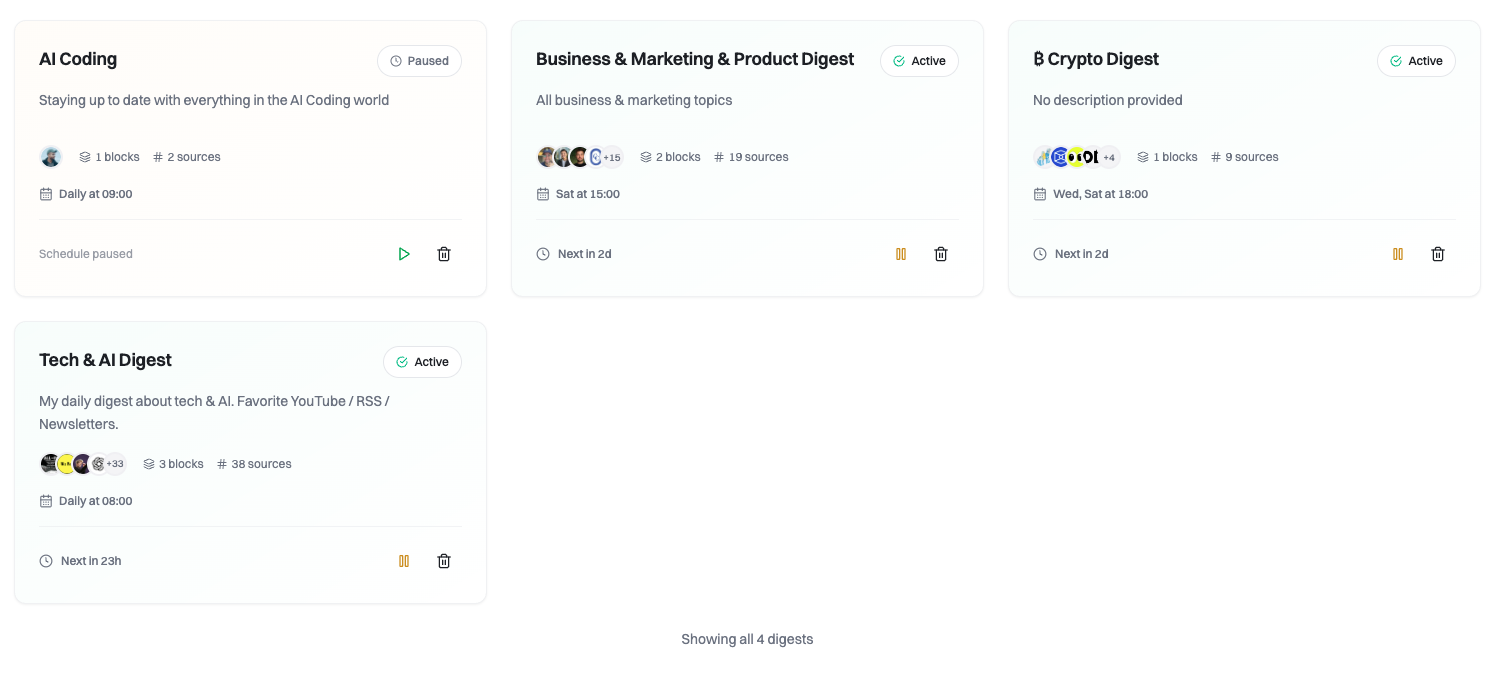
Digests start in **Draft** state so you can review before activation:
1. Review your blocks, sources, and schedule
2. Click **Activate** when ready
3. Your first digest arrives at the next scheduled time
Once activated, your digest will be generated and sent automatically. You can pause or edit it anytime.
## What Happens Next?
When your scheduled time arrives, your digest will:
1. **Collect new content** from all your sources since the last digest
2. **Generate AI summaries** based on your [custom instructions](/concepts/ai)
3. **Deliver to your email** inbox and make available on the [web reader](/reading/web)
Digests are always delivered **both via email and web**. No need to choose—read wherever is most convenient.
## Next Steps
Learn how digests and blocks work together
Expand your content sources
Explore web reader and email delivery
Go to [summate.io](https://summate.io?ref=docs.summate.io) and click "Start free trial". During onboarding:
1. **Tell us about yourself** - Share your interests so AI can personalize your summaries
2. **Connect your accounts** - Link YouTube and Substack for quick setup
3. **Get personalized digests** - We'll create digests based on your profile, or choose from our curated library
**What you get:**
* 14-day free trial
* 2000 AI credits per month
* Pre-configured digests based on your interests
The more you share during onboarding, the better we can tailor your digest recommendations and AI summaries.
After onboarding, you'll have digests already created for you. Customize them by adding, removing, or editing [blocks](/concepts/blocks):
For newsletters you receive via email:
1. **Create your [Summate Inbox](/concepts/inbox)** - Get a unique address like `username@inbox.summate.io`
2. **Forward newsletters** to your inbox ([setup guide](/guides/auto-forwarding/overview))
3. **Select senders** to include, or choose "Include All" for automatic inclusion
All approved senders are available as sources. Block spam senders with one click.
For YouTube channels you follow:
1. Connect your YouTube account to import subscriptions, or
2. Paste channel URLs manually
3. Select which channels to include
If you connected YouTube during onboarding, your subscriptions are already imported!
For blogs and news sites:
1. Paste website URLs - Summate auto-detects RSS feeds
2. Or add RSS feed URLs directly if auto-detection fails
3. Import Substack subscriptions ([see guide](/guides/substack-import))
If you connected Substack during onboarding, your newsletters may already be added!
Learn more about [how blocks work](/concepts/blocks).
By default, you get **Detailed Summaries** with TLDR and clickable key takeaways. Add custom instructions to personalize what AI focuses on:
* **Block-level**: "Focus on pricing and business models"
* **Digest-level**: "Emphasize actionable insights"
* **Account-level**: "Write for a technical audience"
Learn more about [AI customization](/concepts/ai).
Your digests come with recommended schedules, but you can adjust when to receive them:
* **Daily** - Every day at your chosen time (multiple times allowed, 4hr minimum apart)
* **Weekly** - Pick specific day(s) and time
* **Monthly** - Choose which days of the month
Set your timezone during onboarding or later in [account settings](/account).
Digests start in **Draft** state so you can review before activation:
1. Review your blocks, sources, and schedule
2. Click **Activate** when ready
3. Your first digest arrives at the next scheduled time
Once activated, your digest will be generated and sent automatically. You can pause or edit it anytime.
## What Happens Next?
When your scheduled time arrives, your digest will:
1. **Collect new content** from all your sources since the last digest
2. **Generate AI summaries** based on your [custom instructions](/concepts/ai)
3. **Deliver to your email** inbox and make available on the [web reader](/reading/web)
Digests are always delivered **both via email and web**. No need to choose—read wherever is most convenient.
## Next Steps
Learn how digests and blocks work together
Expand your content sources
Explore web reader and email delivery